

Having trouble launching ARC Raiders on PC? Whether the game crashes right after you click play, won’t open at all, or silently closes after the splash screen, you’re not alone. These startup issues are common—especially during early releases or updates—and can usually be fixed with a few simple steps.
This guide walks you through proven methods to fix ARC Raiders not launching, including how to use Easy Gamer Utility, a lightweight repair tool that automatically detects and fixes common PC gaming problems.
Why ARC Raiders Won’t Launch on PC
If ARC Raiders refuses to start, the problem usually comes down to one of the following:
- Incomplete or corrupted installation
- Missing game dependencies (DirectX, Visual C++, .NET)
- Conflicts with overlays or background software
- Outdated graphics drivers
- Antivirus or firewall blocking the game’s process
- User permission or access issues
Quick Fix: Use Easy Gamer Utility
The fastest way to fix ARC Raiders launch errors is by using Easy Gamer Utility.
This small tool automatically repairs missing files, clears corrupted settings, and checks for conflicts that prevent your games from starting.
How to Use Easy Gamer Utility
- Download Easy Gamer Utility from the official site.
- Open the program and go to the Fix Tab.
- Manually locate the ARC Raiders
.exefile in your installation directory. - Click Apply Fix.
- Let the software scan for:
- Background apps blocking the process
- Incorrect permission flags
- Try launching ARC Raiders again.
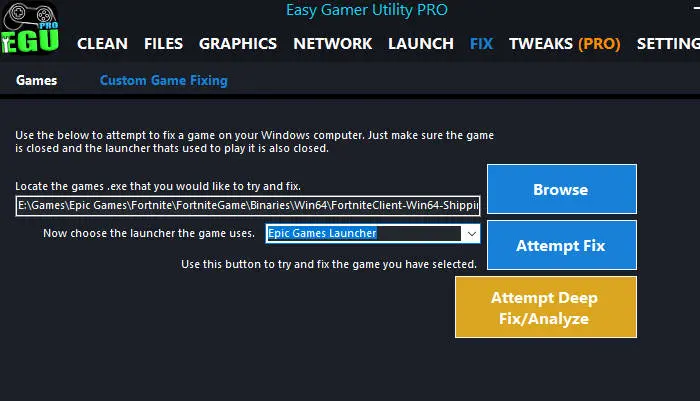
Easy Gamer Utility also includes GPU detection, crash repair tools, and a clean startup mode to help improve performance and stability.
Manual Fixes for ARC Raiders Not Launching
If you prefer a hands-on approach, the following steps will help you identify and fix common launch problems manually.
1. Run ARC Raiders as Administrator
Lack of permission can prevent the game from executing properly.
How to do it:
- Go to your ARC Raiders installation folder.
- Right-click
ArcRaiders.exeand select Properties. - Under the Compatibility tab, check:
- “Run this program as an administrator.”
- “Disable fullscreen optimizations.”
- Click Apply, then relaunch the game.
2. Update Your Graphics Drivers
Outdated or corrupt GPU drivers are one of the main reasons ARC Raiders won’t start.
- For NVIDIA GPUs: Download the latest driver.
- For AMD GPUs: Download Radeon drivers.
When installing, choose Clean Install or Factory Reset to remove old driver data.
3. Verify ARC Raiders Game Files
Corrupted or missing files can cause ARC Raiders to crash before launch.
For Steam users:
- Open your Steam Library.
- Right-click ARC Raiders > Properties > Installed Files.
- Select Verify integrity of game files.
For Epic Games Launcher:
- Open your Library.
- Click the three dots next to ARC Raiders.
- Select Verify.
This will replace any damaged or missing files.
4. Install Missing Game Dependencies
ARC Raiders may fail to launch if key runtime files are missing.
Install or update the following:
- DirectX End-User Runtime
- Visual C++ Redistributables (2015–2022)
- .NET Framework
After installation, restart your PC before relaunching ARC Raiders.
5. Disable Background Applications and Overlays
Some background tools or overlays can interfere with ARC Raiders’ startup.
Close or disable the following if active:
- Discord overlay
- Razer Synapse
- MSI Afterburner
- GeForce Experience overlay
- RGB control software
Also disable Xbox Game Bar under Settings > Gaming > Xbox Game Bar > Off.
If using Steam or Epic Games, disable their in-game overlay options as well.
6. Temporarily Disable Antivirus or Firewall
Security software can sometimes block ARC Raiders from launching.
Try this:
- Add the ARC Raiders installation folder to your antivirus exclusion list.
- Temporarily turn off real-time protection and test the game.
- Re-enable protection after testing to stay secure.
If the game launches with antivirus disabled, add it as a permanent exception.
7. Check for Windows Updates
Missing Windows updates can break compatibility with newer games.
Steps:
- Open Settings > Windows Update.
- Click Check for updates.
- Install all pending updates.
- Restart your system once complete.
Still Not Launching?
If ARC Raiders still won’t open after trying all of the above:
- Uninstall and reinstall the game on a different drive (preferably an SSD).
- Run Easy Gamer Utility again after reinstalling to apply a clean configuration.
- Try creating a new Windows user account and testing from there.
These steps help rule out deeper configuration or user-profile problems.
Common Search Terms Related to ARC Raiders Launch Problems
Players searching for fixes often use these phrases:
- ARC Raiders not launching PC
- ARC Raiders won’t open Windows 10 / 11
- ARC Raiders splash screen then nothing
- ARC Raiders closes instantly on startup
- ARC Raiders crash on launch fix
- ARC Raiders won’t start after install
- ARC Raiders exe does nothing
Final Tip
ARC Raiders is a demanding online title, and launch issues can happen—especially right after patches or driver updates. Using Easy Gamer Utility is often the quickest solution, automatically detecting missing files, fixing registry errors, and repairing common launch failures in one click.
By combining the steps above with a clean driver install and updated dependencies, you can usually resolve ARC Raiders startup issues and get back into the game quickly.