

If you’re experiencing discomfort due to motion effects like camera shake in Donkey Kong Bananza, you’re not alone.
Many players have reported that the game’s dynamic camera system, especially during intense action sequences, can cause motion sickness or just be really frustrating.
Fortunately, the game offers an option to turn off camera shake, providing a more comfortable experience.

🛠️ How to Turn Off Camera Shake
To disable camera shake in Donkey Kong Bananza on your Switch 2:
- Pause the Game: Press the + button on your Nintendo Switch 2 to bring up the pause menu.
- Navigate to Options: Select Options from the menu.
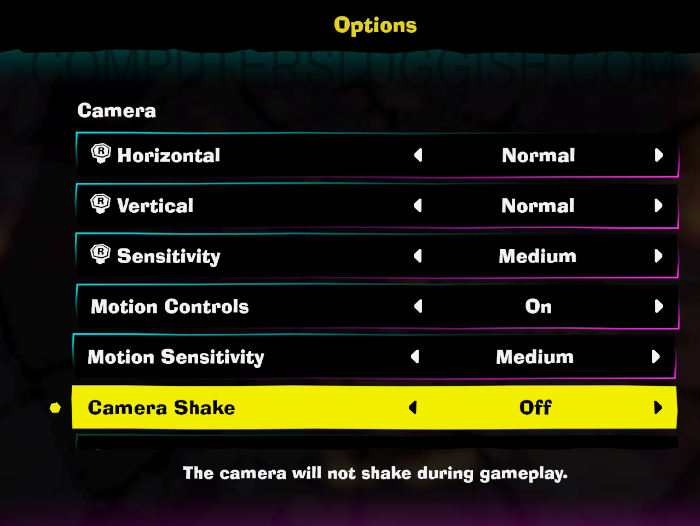
- Adjust Camera Settings: In the Options menu, look for the Camera Settings section.
- Disable Camera Shake: Toggle the Camera Shake option to Off.
This adjustment will eliminate the camera shake effects during gameplay, potentially reducing motion-related discomfort.
🎮 Additional Tips for Reducing Motion Discomfort
If turning off camera shake doesn’t fully stop issues, consider these additional adjustments:
- Lower Camera Sensitivity: In the Camera Settings, reduce the Camera Sensitivity to make movements less abrupt.
- Shake Intensity: Turn down the intensity to help unwanted camera movements.
- Adjust Field of View (FOV): Increasing the FOV can provide a broader perspective, reducing the feeling of being too close to the action.
- Play in Handheld Mode: Some players find that playing in handheld mode offers a more stable and less disorienting experience compared to docked mode.
By customizing these settings, you can tailor the game’s visual experience to your preferences, ensuring a more enjoyable and comfortable adventure with Donkey Kong.