
Mixed content errors are one of the most common technical problems that occur after installing an SSL certificate or migrating a website from HTTP to HTTPS. Even when the SSL certificate is valid and correctly installed, browsers such as Chrome, Edge, and Firefox may still display “Not Secure” warnings.
This happens because modern browsers do not only verify the SSL certificate itself. They verify every individual resource loaded by the page. If even one resource loads over HTTP instead of HTTPS, the browser considers the page partially insecure.
This creates what is known as a mixed content error.
Mixed content errors can:
• break the secure padlock icon
• trigger browser security warnings
• reduce user trust
• prevent scripts from executing
• break website functionality
• negatively affect SEO and crawlability
Fixing mixed content is essential for ensuring your website is fully secure, properly trusted by browsers, and efficiently processed by search engines.
What Is Mixed Content and Why It Happens
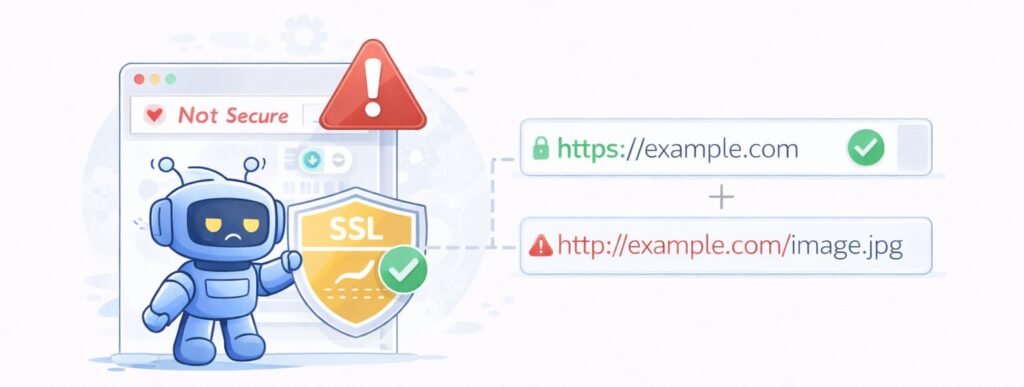
Mixed content occurs when a webpage loads over HTTPS but includes resources that load over HTTP.
For example, your website may load securely using:
https://example.com
But the page contains an image, stylesheet, or script loaded using:
http://example.com/image.jpg
This creates an inconsistent security state.
The main HTML document is encrypted, but some resources are not.
Browsers detect this inconsistency and flag the page as insecure.
Mixed content errors commonly occur after:
• installing an SSL certificate
• migrating a website from HTTP to HTTPS
• restoring backups from older HTTP versions
• installing themes or plugins containing HTTP links
• moving websites between servers
These problems are extremely common and affect many websites worldwide.
Why Browsers Block Mixed Content

Modern browsers enforce strict security policies.
When a website loads over HTTPS, the browser expects all resources to load securely.
If insecure resources load, attackers could potentially intercept or modify those resources.
For example, an attacker could modify an insecure JavaScript file and inject malicious code.
Because of this risk, browsers may:
• block insecure scripts entirely
• display security warnings
• remove the secure padlock icon
• prevent certain features from functioning
Even if the SSL certificate itself is valid, mixed content prevents the browser from fully trusting the page.
Types of Mixed Content (Detailed Explanation)
Mixed content falls into two categories:
Passive Mixed Content
Passive content includes resources that do not directly execute code.
Examples include:
• images
• videos
• audio files
These resources do not directly affect page functionality, but they still weaken overall security.
Browsers may still display warnings.
Passive mixed content can reduce user trust and damage credibility.
Active Mixed Content (More Severe)
Active mixed content includes resources that directly affect page behaviour.
Examples include:
• JavaScript files
• CSS stylesheets
• AJAX requests
• iframes
• external scripts
This type is more dangerous because it can modify page behaviour.
Browsers often block active mixed content completely.
This can break:
• navigation menus
• enquiry forms
• login systems
• tracking scripts
• interactive features
This is why mixed content errors can silently break website functionality.
Most Common Causes of Mixed Content Errors

Mixed content errors usually originate from outdated or hard-coded resource links.
Common causes include:
Hard-Coded HTTP URLs
Many websites contain hard-coded links in:
• theme files
• template files
• page builders
• custom code
These links may still reference HTTP.
Images Still Using HTTP
Images are one of the most frequent causes.
Older images uploaded before SSL installation may still load using HTTP.
This is extremely common.
Plugin or Theme Resources
Plugins and themes may load:
• scripts
• stylesheets
• external resources
If these use HTTP, mixed content errors occur.
Database-Stored Links
Many CMS systems store full URLs in databases.
These may still reference HTTP.
For example:
http://example.com/uploads/image.jpg
Instead of HTTPS.
External Services or CDN Misconfiguration
External services may load insecure resources.
Examples include:
• external fonts
• analytics scripts
• CDN resources
These must also use HTTPS.
How to Identify Mixed Content Errors (Detailed Methods)

Method 1: Using Chrome Developer Tools
This is the fastest manual method.
Steps:
- Open your website in Chrome
- Right click → Inspect
- Click Console tab
Look for warnings such as:
Mixed Content: The page was loaded over HTTPS, but requested an insecure resource.
This shows exactly which resource is insecure.
Method 2: Using SEO Crawlers (Recommended)
Manual checking is unreliable, especially for large websites.
SEO crawlers such as:
• CrawlRhino SEO Crawler
• Screaming Frog SEO Spider
• Semrush Site Audit
• Ahrefs Site Audit
• W3C Link Checker
can scan your entire website automatically.
They detect:
• insecure images
• insecure scripts
• insecure CSS files
• HTTP internal links
• redirect issues
During technical website audits, mixed content errors are one of the most frequently detected HTTPS problems. These issues are commonly identified during professional website optimisation and rebuild projects, where ensuring proper HTTPS implementation is critical for performance, SEO, and security.
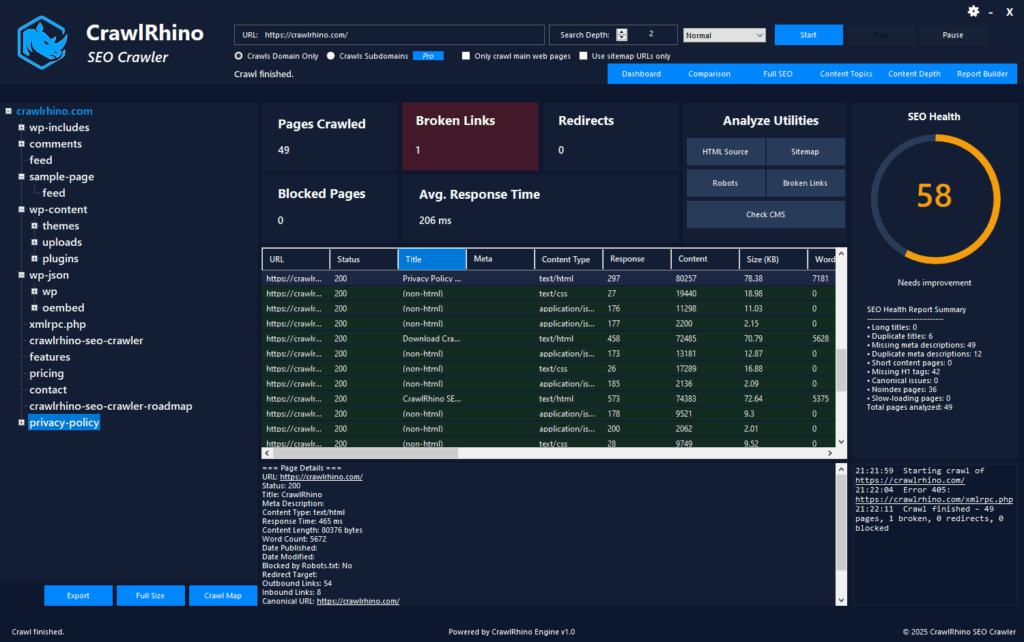
CrawlRhino SEO Crawler is especially effective for Windows users because it provides detailed analysis of resource loading, link structure, and security issues.
Download here:
https://crawlrhino.com/crawlrhino-seo-crawler/
How to Fix Mixed Content Errors (Complete Technical Fix Guide)
Fixing mixed content requires identifying and updating all insecure resource links.
Step 1: Update All Internal Links
Replace:
http://example.com/page
with:
https://example.com/page
This ensures secure navigation.
Step 2: Update Image URLs
Update all images to use HTTPS.
Images are one of the most common mixed content sources.
Step 3: Update CSS and JavaScript Files
Check your theme and templates.
Ensure all scripts and stylesheets use HTTPS.
Step 4: Fix Database URLs
Database-stored HTTP URLs must be updated.
This is critical.
Many mixed content problems originate here.
Step 5: Fix External Resource URLs
Ensure all external resources use HTTPS.
This includes:
• fonts
• scripts
• CDNs
Step 6: Force HTTPS Redirects
Ensure all HTTP requests redirect to HTTPS.
This ensures users never access insecure versions.
Step 7: Clear Cache Completely
Clear:
• browser cache
• server cache
• CDN cache
Cached HTTP resources can cause persistent warnings.
How CrawlRhino Helps Detect HTTPS and Mixed Content Issues
Manual detection can miss hidden issues.
CrawlRhino SEO Crawler scans your entire website and identifies:
• HTTP resource links
• mixed content errors
• redirect chains
• insecure internal links
• crawl inefficiencies
This allows you to quickly identify and fix HTTPS problems.
Without proper crawling tools, mixed content errors can remain undetected.
Why Mixed Content Errors Affect SEO and Rankings
Search engines prioritise secure websites.
Mixed content errors can cause:
• reduced crawl efficiency
• reduced trust signals
• indexing issues
• broken functionality
Google uses HTTPS as a ranking signal.
Secure websites perform better in search results.
Fixing mixed content improves crawlability and indexing.
Long-Term Prevention of Mixed Content Errors
To prevent mixed content errors:
• ensure all new resources use HTTPS
• avoid hard-coded HTTP URLs
• scan websites regularly using SEO crawlers
• ensure plugins and themes are properly configured
Regular scanning using tools like CrawlRhino helps maintain security.
Final Thoughts

Mixed content errors occur when insecure HTTP resources load on secure HTTPS pages. Even when SSL certificates are valid, insecure resources prevent browsers from fully trusting the website.
These errors commonly originate from outdated links, images, scripts, or database entries that still reference HTTP instead of HTTPS.
Fixing mixed content requires identifying and updating all insecure resource links, ensuring proper redirects, and scanning websites for insecure resources.
Tools such as CrawlRhino SEO Crawler make it significantly easier to detect and resolve mixed content errors across entire websites.
Ensuring your website loads fully over HTTPS improves security, user trust, search engine performance, and long-term reliability.