
How do i fix a broken link on my website
If you run a website, one problem that eventually appears on almost every site is broken links. These are links that point to pages that no longer exist or return errors like a 404 page not found.
Learning how to find broken links on a website is an important part of maintaining a healthy website and improving your SEO.
Over time pages get deleted, URLs change, images move, or external websites disappear. When this happens, links on your website can stop working without you even noticing.
In this guide I’ll walk through how to find broken links on a website, why they matter for SEO, and how you can fix them properly.
What Broken Links on a Website Actually Are
A broken link is simply a hyperlink that points to a page that cannot be found.
Instead of opening a page, visitors might see errors such as:
- 404 page not found
- page does not exist
- server not found
- content removed
These broken links can appear in different places across your website such as:
- internal links between pages
- external links pointing to other websites
- image links
- navigation menus
- blog content
If your website has been running for a while, it’s very common to have broken links on a website without realising.
Why Broken Links Are Bad for SEO
Many website owners underestimate the impact broken links can have.
When you have too many broken links on a website, several problems can occur.
First, broken links create a bad user experience. If visitors click a link expecting useful content and end up on a dead page, they may leave your website immediately.
Second, search engines crawl links to understand your website structure. If search engines constantly encounter 404 errors, it can make your website appear poorly maintained.
Third, broken internal links can prevent search engines from properly discovering and crawling important pages.
This is why regularly checking broken links on a website is considered a basic part of technical SEO.
How to Find Broken Links on a Website
There are several different ways to check broken links on a website. Some methods are simple but slow, while others involve using SEO tools that scan your entire website automatically.
Manually Checking Website Links
The most basic method is manually clicking links across your website.
For example, you might:
- open pages on your site
- click links in blog posts
- test navigation menus
- check footer links
While this works for very small websites, it becomes almost impossible if your website contains dozens or hundreds of pages.
That’s why most website owners eventually start using tools that can scan all links on a website automatically.
Using a Broken Link Checker Tool
A much faster way to find broken links on your website is by using a website crawler.
Website crawling tools scan every page and check all links automatically. This allows you to quickly identify:
- 404 links
- dead links
- broken image links
- redirect errors
- internal broken links
Running a crawl is one of the easiest ways to identify broken links on a website.
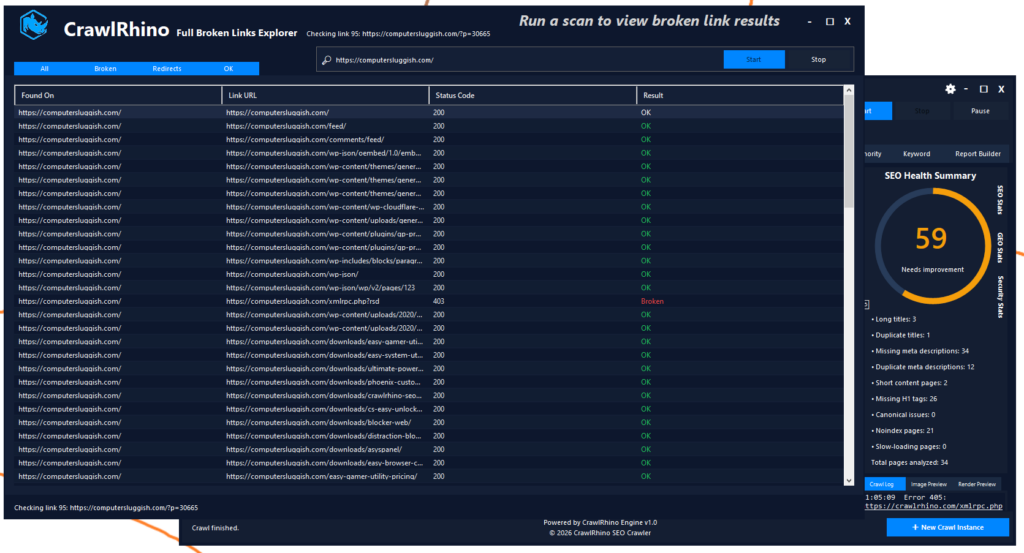
For example, tools like CrawlRhino SEO Crawler allow you to crawl your entire website and quickly detect broken links across all pages.
I actually built CrawlRhino mainly because I wanted a desktop crawler that could quickly scan websites and highlight technical SEO problems like broken links, missing metadata, and crawl errors while I was working on sites.
Instead of manually checking links, the crawler can analyse thousands of links in minutes.
How to Find Broken Links on Your Website Step by Step
If you want to find broken links on your website, the process usually looks something like this.
First, enter your website URL into a crawler or broken link checker tool.
The tool will begin crawling your website and collecting all internal and external links.
Once the crawl finishes, the tool will show a report containing:
- pages with 404 errors
- broken internal links
- broken external links
- missing images
- redirect chains
From there you can quickly see which pages need fixing.
This is one of the easiest ways to detect broken links on a website without manually testing everything.
How to Fix Broken Links on a Website
Once you find broken links on a website, the next step is fixing them.
There are a few common ways to do this depending on the situation.
Update the Link
If the page still exists but the URL changed, simply update the link to the correct address.
Remove the Link
If the page no longer exists and there is no replacement, the easiest solution may be removing the link.
Add a Redirect
If you deleted a page but have a similar page available, you can create a redirect so visitors automatically go to the correct page.
Redirects are often used when websites restructure content or change URLs.
Replace Broken External Links
Sometimes websites link to external resources that no longer exist.
In these cases it’s best to replace the broken external link with a newer, relevant resource.
Checking Broken Links Regularly
One mistake many website owners make is only checking broken links once.
Websites constantly change over time, so new broken links can appear without warning.
Pages may be deleted, products removed, or external websites may disappear.
That’s why it’s a good idea to regularly check for broken links on your website, especially if you publish content frequently.
Running a crawl every few months can help keep your site clean and avoid hidden technical SEO problems.
Why Website Crawlers Are Useful for Finding Broken Links
Website crawlers are extremely useful because they analyse the entire structure of your website.

Instead of checking links one page at a time, crawlers can:
- find broken links on every page
- detect broken images
- discover 404 pages
- identify internal linking problems
- analyse all URLs on a website
This type of analysis makes it much easier to maintain a technically healthy website.
Tools like CrawlRhino SEO Crawler were designed specifically for this kind of technical website analysis. It allows you to crawl your site and identify problems such as broken links that could affect both user experience and search engine rankings.
Final Thoughts
Learning how to find broken links on a website is a basic but important part of website maintenance.
Broken links can damage user experience, create crawl issues for search engines, and make your website look outdated or poorly maintained.
By regularly checking your website and fixing broken links, you can keep your site running smoothly and avoid unnecessary SEO problems.
Using tools that crawl your website can make this process much faster, especially if your site has many pages or a large number of links.
Keeping your website technically clean may seem like a small task, but over time it can make a big difference to how search engines view your site and how users experience it.