

Forza Horizon 6 PC Error Codes
If Forza Horizon 6 is crashing on PC, closing to desktop, freezing, or showing an error code when you try to launch the game, then this guide will help explain what the error means and what you can try to fix it.
When Forza Horizon 6 crashes on PC, you may see a pop-up error message appear after the game closes. This error code can help you work out what has gone wrong, whether it is a graphics card issue, not enough memory, a driver problem, or something missing from Windows.
So if you are getting Forza Horizon 6 crash on startup, Forza Horizon 6 crashing to desktop, Forza Horizon 6 not launching, or a specific FH error code, check the list below.
It is also worth taking a screenshot of the error message. If you need to contact Forza Support, they will usually need to see the exact error code that appeared when the game crashed.
You can use Easy Gamer Utility to fix Forza Horizon 6:
You can download Easy Gamer Utility for FREE here: https://computersluggish.com/downloads/easy-gamer-utility/
Forza Horizon 6 Crash Error Categories
Forza Horizon 6 PC crash errors are normally split into a few different types. These help show what part of your PC is causing the problem.
You may see one of these crash categories:
- FHC means a video card crash
- FHD means the game has run out of video memory
- FHE means a general game crash
- FHF means your PC has run out of system memory
So if Forza Horizon 6 keeps crashing on PC, the error category can help point you in the right direction before you start changing random settings.
FH101 Error In Forza Horizon 6
The FH101 error in Forza Horizon 6 means your processor does not meet the minimum CPU thread requirement.
Forza Horizon 6 needs at least 6 CPU logical processors and 6 threads. If your processor has fewer than this, the game may fail to launch and show the FH101 error.
How to fix FH101
Unfortunately, this is usually a hardware limitation. You can try checking that your CPU is being detected correctly in Windows, but if your processor does not meet the minimum requirement, you may need a newer CPU or PC to play the game.
To check your CPU:
- Right-click the Windows Start menu
- Click Task Manager
- Go to the Performance tab
- Click CPU
- Check the number of logical processors
If it shows fewer than 6, that is likely why Forza Horizon 6 is not launching.
FH113 Error In Forza Horizon 6
The FH113 error in Forza Horizon 6 usually means there may be an issue with your processor support or BIOS version.
This error can appear if your motherboard BIOS is outdated and does not fully support your CPU properly.
How to fix FH113
The main fix is to check for a BIOS update for your motherboard.
You will need to go to your motherboard or PC manufacturer’s website and look for the latest BIOS update for your exact model.
This is more advanced than updating a normal program, so only do this if you are confident. If you are unsure, ask someone experienced to help because updating the BIOS incorrectly can cause problems.
FH201 Error In Forza Horizon 6
The FH201 error in Forza Horizon 6 means your graphics card does not support the DirectX 12 features that the game needs.
This can happen if your GPU is too old, unsupported, or your graphics driver is out of date.
How to fix FH201
Try these steps:
- Update your graphics card driver
- Restart your PC
- Check your graphics card meets the minimum requirements
- Make sure Windows is fully updated
If your graphics card does not support the required DX12 features, then sadly the game may not run on that GPU.
This error is common when Forza Horizon 6 crashes on startup PC or refuses to open at all.
FH202 Error In Forza Horizon 6
The FH202 error in Forza Horizon 6 means your graphics card has less than 4GB of VRAM.
VRAM is the memory built into your graphics card. Forza Horizon 6 needs enough video memory to load textures, cars, environments, and effects.
If your GPU has less than 4GB of VRAM, you may get the FH202 error, or the game may crash, freeze, or close after launch.
How to fix FH202
If your graphics card has less than 4GB VRAM, there is not much you can do other than upgrade the graphics card.
But you can still try:
- Lowering your graphics settings
- Closing other apps before launching the game
- Updating your graphics driver
- Making sure the game is using your dedicated GPU, not integrated graphics
This can sometimes help if Forza Horizon 6 is freezing on PC or crashing due to low video memory.
FH203 Error In Forza Horizon 6
The FH203 error in Forza Horizon 6 is another graphics card DirectX 12 issue.
It means your GPU does not support one of the DX12 features needed by the game.
How to fix FH203
Try updating your graphics driver first.
You should download the latest driver from Nvidia, AMD, or Intel, depending on your graphics card.
After updating, restart your PC and try launching Forza Horizon 6 again.
If the error still appears, your graphics card may not support the required features, even if it technically supports DirectX 12.
FH204 Error In Forza Horizon 6
The FH204 error in Forza Horizon 6 also means your graphics card is missing required DirectX 12 support.
This can stop the game from launching or cause Forza Horizon 6 crash on startup problems.
How to fix FH204
Try the following:
- Update your GPU driver
- Install the latest Windows updates
- Restart your PC
- Check your GPU meets the minimum requirements
If your graphics card is older, then this may be a hardware compatibility issue rather than a Windows problem.
FH205 Error In Forza Horizon 6
The FH205 error in Forza Horizon 6 means your graphics card does not support the required DX12 features.
This is very similar to FH201, FH203, and FH204.
How to fix FH205
First, update your graphics driver. Then make sure your PC is running a supported version of Windows.
You should also check that Forza Horizon 6 is not trying to use integrated graphics instead of your proper gaming GPU.
To check this:
- Open Windows Settings
- Go to System
- Click Display
- Go to Graphics
- Find or add Forza Horizon 6
- Set it to High performance
Then launch the game again.
FH206 Error In Forza Horizon 6
The FH206 error in Forza Horizon 6 is another DirectX 12 graphics card error.
If you see this error, the game has detected that your GPU does not support something it needs to run correctly.
How to fix FH206
Try this:
- Update your graphics card driver
- Update Windows
- Restart your computer
- Make sure the game is using your dedicated graphics card
- Check your GPU is supported
If you still get the FH206 error after this, your graphics card may not be compatible with Forza Horizon 6.
FH301 Error In Forza Horizon 6
The FH301 error in Forza Horizon 6 means your graphics card driver needs to be updated.
This is one of the easier errors to fix and is very common when a new game has just launched.
If Forza Horizon 6 is crashing on PC, updating your driver should be one of the first things you try.
How to fix FH301
Update your graphics driver using the correct software for your GPU:
- Nvidia users can use GeForce Experience or the Nvidia website
- AMD users can use AMD Software Adrenalin Edition
- Intel users can use Intel Driver & Support Assistant
After the driver has installed, restart your PC and open Forza Horizon 6 again.
This can help fix:
- Forza Horizon 6 crashing on startup
- Forza Horizon 6 crashing to desktop
- Forza Horizon 6 freezing PC
- Forza Horizon 6 black screen crash
- Forza Horizon 6 driver crash
FH302 Error In Forza Horizon 6
The FH302 error in Forza Horizon 6 means you should check that your graphics card meets the minimum requirements and that your drivers are up to date.
This error may appear if your GPU is unsupported, too old, or running an outdated driver.
How to fix FH302
Try these steps:
- Update your graphics card driver
- Restart your PC
- Check the game’s minimum PC requirements
- Make sure Windows is updated
- Lower your graphics settings if the game opens
If your GPU is below the minimum spec, Forza Horizon 6 may keep crashing or may not launch at all.
FH401 Error In Forza Horizon 6
The FH401 error in Forza Horizon 6 means your PC does not have enough system memory.
System memory means your normal RAM, not your graphics card VRAM.
If your PC does not have enough RAM available, you may see this error, or you may notice Forza Horizon 6 freezing, stuttering, crashing, or closing to desktop.
How to fix FH401
Try these fixes:
- Close background apps before opening the game
- Close web browsers, Discord, launchers, recording software, and other programs
- Restart your PC before playing
- Make sure your PC meets the minimum RAM requirement
- Increase your Windows virtual memory/page file
- Upgrade your RAM if your PC is below the requirement
If your PC only just meets the RAM requirement, you may still get crashes if too many apps are open in the background.
FH601 Error In Forza Horizon 6
The FH601 error in Forza Horizon 6 means Windows is unable to load Microsoft Media Foundation.
This can happen if important Windows media components are missing. It is more common on some Windows editions, especially versions that do not include normal media features.
How to fix FH601
You may need to install the Microsoft Media Feature Pack or missing Windows media components.
Try this first:
- Open Windows Settings
- Go to Apps
- Click Optional features
- Search for Media Feature Pack
- Install it if available
- Restart your PC
If that option is not there, you may need to download the Media Feature Pack from Microsoft.
Once installed, restart your computer and try launching Forza Horizon 6 again.
How To Fix Forza Horizon 6 Crashing With Easy Gamer Utility
If you are not sure what is causing the crash, you can also try using Easy Gamer Utility to attempt a custom game fix for Forza Horizon 6.

This can help if Forza Horizon 6 keeps crashing, closes after launch, crashes on startup, or crashes to desktop.
You can download Easy Gamer Utility here: https://computersluggish.com/downloads/easy-gamer-utility/
Once installed, do this:
- Open Easy Gamer Utility
- Click the Fix button
- Under Custom Game Fixing, click Browse
- Select the Forza Horizon 6 .exe file
- Select the launcher you purchased the game on, such as Steam, Xbox app, Microsoft Store, or Game Pass
- Click Attempt Fix
- Restart your PC
- Open Forza Horizon 6 again
This is a good step to try if you are getting a general Forza Horizon 6 game crash, Forza Horizon 6 crash to desktop, or Forza Horizon 6 not launching problem.
General Fixes For Forza Horizon 6 PC Error Codes
If you are getting any Forza Horizon 6 PC error code, it is worth trying these basic fixes as well.
Update Windows
Make sure Windows is fully updated, as missing system files or old Windows builds can cause launch and crash problems.
Go to:
Settings > Windows Update > Check for updates

Install everything available, then restart your PC.
Verify The Game Files
If you are playing through Steam, verify the game files.
- Open Steam
- Go to your Library
- Right-click Forza Horizon 6
- Click Properties
- Go to Installed Files
- Click Verify integrity of game files
If you are using the Xbox app or Microsoft Store, try repairing the game from Windows Apps settings.
Disable Overlays
Overlays can sometimes cause Forza Horizon 6 to crash.
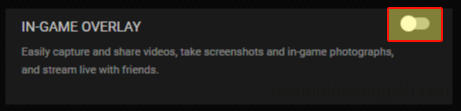
Try disabling:
- Steam Overlay
- Xbox Game Bar
- Discord Overlay
- Nvidia Overlay
- AMD Overlay
- MSI Afterburner
- RivaTuner
- Overwolf
Then restart your PC and test the game again.
Lower Graphics Settings
If Forza Horizon 6 opens but crashes while playing, try lowering the graphics settings.
Lower settings like:
- Texture quality
- Shadows
- Reflections
- Ray tracing
- Environment detail
- Anti-aliasing
This is especially useful if you are getting video memory errors or Forza Horizon 6 freezing PC problems.
Check Your PC Specs
Some Forza Horizon 6 error codes are caused by your PC not meeting the minimum requirements.
If your CPU, GPU, VRAM, or RAM is below the minimum, the game may not launch or may keep crashing even after trying the other fixes.
Check out this video on what else you can do to fix FH6:
Final Thoughts
Hopefully this guide has helped you understand the different Forza Horizon 6 PC error codes and what they mean.
If you are getting FH101, FH113, FH201, FH202, FH203, FH204, FH205, FH206, FH301, FH302, FH401, or FH601, then the issue is normally linked to your CPU, graphics card, graphics driver, RAM, VRAM, BIOS, or missing Windows media components.
For general crashes, try updating your graphics driver, verifying the game files, updating Windows, disabling overlays, and using Easy Gamer Utility to attempt a Forza Horizon 6 custom game fix.
With new PC game releases, crashing problems are fairly common at launch, so it is also worth keeping the game updated as patches may improve stability over time.