
Free SEO Spider Tool for Windows
If you’re looking for a free SEO spider tool for Windows, you’re probably trying to audit a website, find SEO problems, or understand how search engines see your pages.
SEO crawlers — sometimes called SEO spiders — are essential tools for technical SEO. They scan your website the same way search engines do, helping you uncover issues that can stop pages from ranking properly.
As more SEO tools move to cloud platforms, desktop SEO crawlers offer a different approach for Windows users, running audits locally and giving greater control and flexibility during technical analysis.
In this guide, we’ll explain what an SEO spider does, why desktop crawlers are still incredibly valuable, and how tools like CrawlRhino SEO Crawler provide a modern free solution for technical website analysis.
What Is an SEO Spider Tool?

An SEO spider is software that crawls websites by following links from page to page, collecting important SEO data along the way.
It works similarly to how Googlebot scans websites.
A typical crawl analyses:
- Page titles and meta descriptions
- Headings (H1, H2, H3 structure)
- Broken links and redirects
- Internal linking structure
- Status codes (404, 301, 500 errors)
- Canonical tags
- Duplicate content issues
- Page performance signals
Instead of manually checking pages one by one, an SEO spider scans an entire site automatically.
Why Use a Windows SEO Spider Instead of Online Tools?

Online SEO tools are convenient, but desktop crawlers offer several advantages.
Full Control Over Crawls
A Windows-based crawler runs locally on your PC, meaning you control speed, depth, and limits without server restrictions.
Faster Crawling for Large Sites
Because the crawl runs directly on your computer, performance depends on your hardware rather than shared cloud resources.
Better Privacy
Your website data stays on your own machine instead of being uploaded to external servers.
For agencies, developers, and site owners who perform regular audits, desktop crawlers remain one of the most efficient SEO workflows.
Introducing CrawlRhino SEO Crawler

CrawlRhino SEO Crawler is a Windows-based SEO spider designed to make technical website auditing accessible without overwhelming complexity.
You can learn more here:
https://crawlrhino.com/crawlrhino-seo-crawler/
Unlike older-style crawlers that feel overly technical, CrawlRhino focuses on providing clear insights while still offering advanced crawling capabilities.
It allows you to analyse websites locally on your Windows PC and quickly identify SEO issues affecting visibility and performance.
Key Features of CrawlRhino SEO Crawler
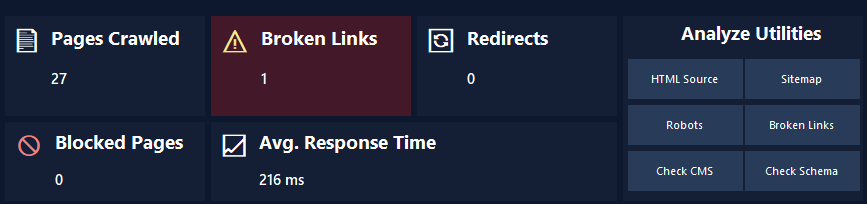
Full Website Crawling
CrawlRhino scans your website structure and maps how pages connect internally, helping you understand crawl depth and link distribution.
This is especially useful for finding orphan pages or sections search engines struggle to reach.
Technical SEO Issue Detection
The crawler highlights common SEO problems such as:
- Missing titles or descriptions
- Broken internal links
- Redirect chains
- Duplicate metadata
- Incorrect status codes
These issues can significantly affect rankings if left unresolved.
JavaScript Rendering Support
Modern websites often rely heavily on JavaScript. CrawlRhino includes rendering capabilities that allow analysis of pages that traditional crawlers may miss.
This helps ensure search engines can properly access dynamic content.
Performance and Data Insights
The tool gathers useful technical data that helps identify optimisation opportunities across your website structure.
Because it runs locally, results are generated quickly without waiting for cloud processing.
Beginner-Friendly Interface
Many SEO crawlers are powerful but intimidating. CrawlRhino aims to balance professional features with a cleaner, easier workflow suitable for:
- Website owners
- Freelancers
- SEO beginners
- Agencies performing audits
Who Should Use a Free SEO Spider Tool?
A Windows SEO spider is useful for anyone managing a website, including:
- Small business owners improving SEO
- Bloggers auditing content structure
- Web designers checking client sites
- SEO professionals performing technical audits
- Developers diagnosing crawl problems
Even small websites benefit from regular crawling because technical errors often go unnoticed otherwise.
Common SEO Problems a Spider Can Find
Many ranking issues are invisible without crawling tools.
For example:
- Pages accidentally blocked from indexing
- Internal links pointing to redirects
- Missing headings affecting structure
- Duplicate pages competing with each other
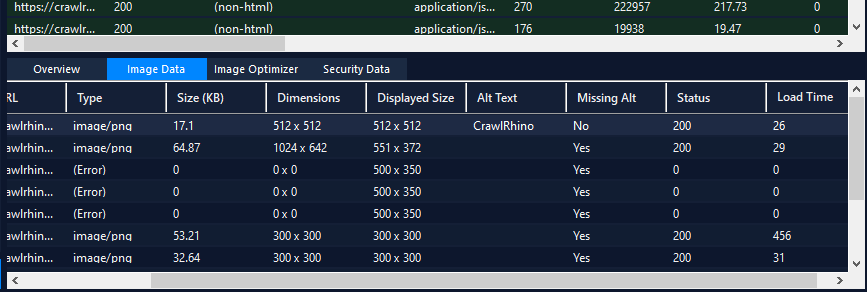
- Broken images or resources
Fixing technical issues like these often produces faster SEO improvements than publishing more content alone.
Why Desktop SEO Crawlers Are Becoming Popular Again
As SEO tools increasingly shift toward cloud-based platforms, desktop SEO crawlers are gaining renewed attention for technical analysis and practical website auditing.
Running a crawler locally gives users direct control over how audits are performed and how data is processed, without relying entirely on remote servers.
A desktop crawler like CrawlRhino offers several practical advantages:
- Fast website audits running directly on your own PC
- Flexible crawling without unnecessary limitations during analysis
- Faster testing and iteration during development or SEO work
- Offline crawling and analysis capabilities
- Full control over your website data and reports
For Windows users especially, desktop SEO spiders remain a powerful and efficient way to analyse websites, whether performing quick audits or deeper technical SEO investigations.
How CrawlRhino Compares to Traditional SEO Crawlers
Traditional crawlers can feel complex and overwhelming for newer users.
CrawlRhino focuses on providing actionable insights without unnecessary clutter while still supporting deeper technical analysis when needed.
This makes it suitable both as a starting SEO spider and as part of a professional workflow.
When Should You Run an SEO Crawl?

Regular crawls help maintain website health.
Good times to run a crawl include:
- After launching a new website
- Following redesigns or migrations
- Before publishing large content updates
- When rankings suddenly drop
- During routine SEO maintenance
Many site owners schedule crawls monthly to catch issues early.
Final Thoughts
Finding a reliable free SEO spider tool for Windows can make a huge difference when improving website visibility. Technical SEO problems often go unnoticed until rankings suffer, and a crawler helps reveal exactly what search engines see.
Desktop tools remain one of the most efficient ways to audit websites, especially for users who prefer full control over how their audits are performed.
CrawlRhino SEO Crawler provides a modern Windows-based solution for crawling websites, analysing technical SEO data, and identifying optimisation opportunities quickly and clearly.
You can learn more or download CrawlRhino SEO Crawler here:
https://crawlrhino.com/crawlrhino-seo-crawler/