
How to Crawl JavaScript Websites for free
Modern websites use a lot more JavaScript than they used to. Frameworks like React, Angular, and Vue allow developers to build fast and interactive sites, but they also make SEO a little more complicated.
The main issue is that JavaScript websites often don’t show their full content in the raw HTML. Instead, the page loads a basic structure first, and then JavaScript fills in the content afterwards.
That’s fine for users because browsers run JavaScript easily. But when it comes to search engines and SEO crawlers, things can get a bit tricky.
If the crawler cannot render the JavaScript, it might miss important content, internal links, or metadata.
That’s why learning how to properly crawl JavaScript websites is important if you want to understand how search engines actually see your site.
Why Normal Crawlers Sometimes Miss JavaScript Content
Traditional SEO crawlers scan the raw HTML of a page. This works perfectly for older websites where all the content is already present in the page source.
But JavaScript websites behave differently.
Instead of sending the final page immediately, the server sends a basic page and JavaScript builds the rest of the content inside the browser.
If a crawler only reads the original HTML, it may never see things like:
- text content loaded after the page opens
- navigation menus generated by JavaScript
- internal links created dynamically
- product listings or blog posts loaded with scripts
This is one of the main reasons some websites struggle with indexing even though they look completely normal when you visit them in a browser.
What JavaScript Rendering Means

To solve this problem, many modern SEO crawlers include something called JavaScript rendering.
This means the crawler loads the page in a browser-like environment, runs the JavaScript, and then analyses the final rendered page instead of just the raw HTML.
In simple terms, it allows the crawler to see the page the same way a real visitor would.
Without rendering, a crawler might think a page is almost empty. With rendering enabled, the crawler can see the full content, links, and metadata.
The Problem With Only Checking One Page
A lot of beginners test JavaScript SEO issues by looking at one page at a time.
For example they might:
- view page source
- use Google Search Console
- inspect the rendered HTML
Those are useful tests, but they only show what happens on a single page.
If your website has dozens or hundreds of pages, checking them manually becomes very time consuming.
This is where running a crawl across the whole site makes a big difference.
Using an SEO Crawler to Crawl JavaScript Websites
When you use a crawler with JavaScript rendering, it can scan your entire site and reveal things that would otherwise be hard to spot.
For example, you might discover:
- pages that appear empty in raw HTML
- internal links only visible after rendering
- titles or headings generated by JavaScript
- missing content in the source code
This gives you a much clearer idea of how search engines might interpret your site.
Testing JavaScript Rendering With CrawlRhino SEO Crawler

One tool I’ve been using for this recently is CrawlRhino SEO Crawler.
You can learn more about CrawlRhino SEO Crawler here.
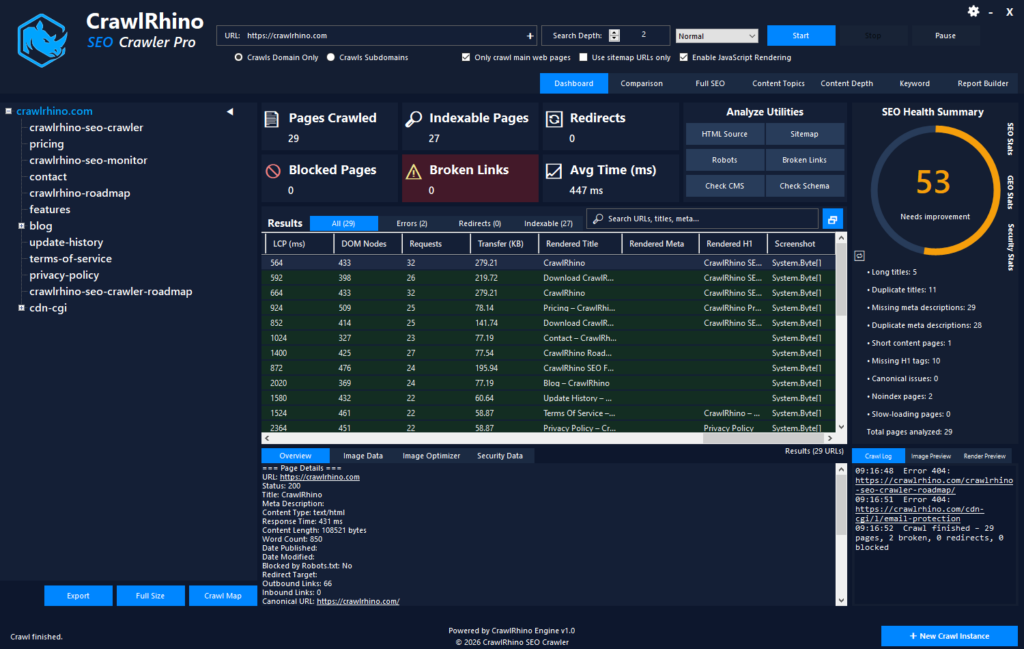
It’s a desktop crawler for Windows that includes JavaScript rendering, which means it can load pages in a browser environment before analysing them.
The way I normally test JavaScript sites is pretty simple.
First I run a crawl without rendering enabled. This shows what a normal crawler sees when it scans the raw HTML.
Then I run another crawl with JavaScript rendering turned on.
Comparing the two results often highlights problems that would otherwise be very easy to miss.
Sometimes the difference between the raw crawl and the rendered crawl can be quite surprising.
What You Might Discover When Crawling JavaScript Sites

When crawling JavaScript websites, you might find things like:
- pages that appear empty in the initial HTML
- navigation links that only exist after scripts run
- headings missing from the raw page source
- metadata injected dynamically
These issues don’t always break SEO completely, but they can slow down indexing or make crawling less efficient.
In my experience, a lot of site owners don’t realise these problems exist until they actually run a proper crawl with rendering enabled.
React and Angular Sites Often Need Rendering
Websites built with React or Angular are especially likely to rely on JavaScript to display their content.
Some of these sites use server-side rendering, which means the content is generated before the page loads. That setup tends to work well for SEO.
Others rely entirely on client-side rendering, where the content only appears after JavaScript runs.
When that happens, using a crawler that supports rendering is almost essential if you want to properly analyse the site.
Crawling JavaScript Sites Is Becoming More Important
A few years ago most websites didn’t rely heavily on JavaScript. Today it’s very common.
Because of that, crawling JavaScript websites has become a normal part of technical SEO work.
If you only analyse raw HTML, you may be missing important parts of how your site actually behaves.
Running a crawl with rendering enabled helps reveal what search engines may see once the page is fully loaded.
My Advice for Testing JavaScript SEO
If you run or manage a modern website, it’s worth checking how your pages behave both before and after JavaScript runs.
Start with basic checks like viewing page source or using Google Search Console, but if you want a clearer picture of your whole site, running a crawler with JavaScript rendering enabled is much easier.
Tools like CrawlRhino SEO Crawler allow you to crawl pages, render the JavaScript, and compare the results so you can spot issues quickly.
You can try it here if you want to test how your own pages render: https://crawlrhino.com/crawlrhino-seo-crawler/
Final Thoughts
JavaScript isn’t bad for SEO, but it does add another layer that needs to be understood.
If content, links, or metadata only appear after scripts run, search engines must render the page to see them. Crawling your site with JavaScript rendering enabled helps reveal exactly what is happening behind the scenes.
Once you understand how your pages load and render, it becomes much easier to fix potential SEO issues before they affect rankings.