

Having trouble launching the Battlefield 6 Beta on your PC? Whether the game crashes immediately, doesn’t open at all, or silently exits after the splash screen, you’re not alone. These issues are common with early beta releases and can often be fixed with a few targeted steps.
This guide walks you through proven methods to fix Battlefield 6 not launching—including how to use Easy Gamer Utility, a lightweight repair tool designed to resolve game-specific startup problems automatically.
Why Battlefield 6 Beta Won’t Launch
There are a few common culprits:
- Incomplete or corrupt game installation
- Missing dependencies (DirectX, Visual C++, .NET)
- Conflicts with overlays or background apps
- Outdated graphics drivers
- Blocked execution by antivirus/firewall
- User permission issues (especially on non-admin accounts)
Quick Fix: Use Easy Gamer Utility
The fastest way to troubleshoot launch issues is with Easy Gamer Utility — a lightweight tool designed to detect and repair common PC gaming problems automatically.
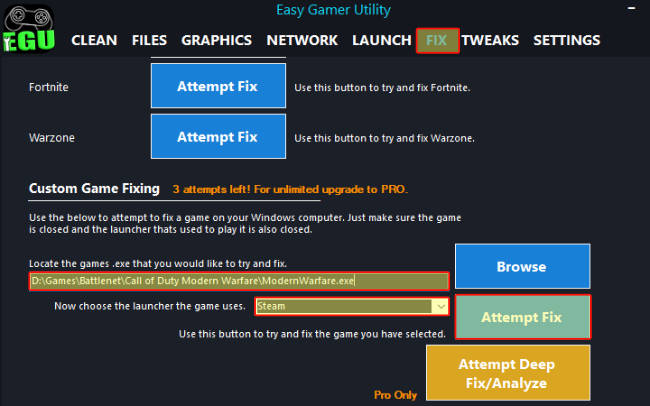
🛠️ How to Use Easy Gamer Utility:
- Download Easy Gamer Utility here
- Launch the utility and select Fix Tab now manually locate the game’s
.exe - Click “Apply Fix”
- Let the software check for:
- Missing DLLs or runtimes
- Broken registry entries
- Conflicting background apps
- Improper compatibility flags
- Restart your PC after the fix is applied
- Try launching Battlefield 6 Beta again
Download Easy Gamer Utility here
Bonus: Easy Gamer Utility also includes GPU detection, common crash fixes, and a clean startup mode for smoother gaming.
Manual Fixes (Step-by-Step)
If you prefer a hands-on approach or want to double-check, follow these steps:
1. Run as Administrator
- Go to your Battlefield 6 Beta install folder
- Right-click on
Battlefield6Beta.exe> Properties > Compatibility - Check “Run this program as an administrator”
- Also check “Disable fullscreen optimizations”
- Click Apply, then try launching again
2. Update Graphics Drivers
Outdated GPU drivers are a common cause of failed launches.
- NVIDIA Users: Download Latest Driver
- AMD Users: Download Radeon Drivers
Perform a clean install if possible using the installer options.
3. Verify Game Files (Steam / EA App)
Corrupted or incomplete files can crash the game before it opens.
- Steam:
Library > Right-click Battlefield 6 Beta > Properties > Installed Files > Verify integrity - EA App:
Library > Click the three dots on Battlefield 6 > Repair
4. Install Required Dependencies
Missing system files may prevent launch:
- DirectX End-User Runtime: Download Here
- Visual C++ Redistributables: Download VC++ Pack
- .NET Framework: Download .NET
Restart your PC after installing.
5. Disable Background Apps and Overlays
These can interfere with the game’s startup:
- Close apps like: Discord, Razer Synapse, MSI Afterburner, RGB tools, GeForce Experience Overlay
- Disable Xbox Game Bar:
Settings > Gaming > Xbox Game Bar > Turn off - Disable Steam/Epic overlays (if using)
6. Temporarily Disable Antivirus/Firewall
Your security software might be blocking Battlefield 6 from launching.
- Add an exception for the game’s folder in your antivirus
- Or temporarily disable real-time protection while testing
- Don’t forget to re-enable protection after testing
7. Check for Windows Updates
Keeping your system updated ensures compatibility with new titles.
- Go to Settings > Update & Security > Windows Update
- Click Check for updates and install anything pending
- Restart afterward
Still Not Working?
If Battlefield 6 Beta still won’t launch:
- Uninstall the game, restart, and reinstall on a different drive (preferably SSD)
- Use Easy Gamer Utility again after reinstalling to apply safe optimizations
- Try creating a new Windows user profile and test launching there
Related Searches This Fixes
- Battlefield 6 Beta not launching PC
- Battlefield 6 won’t open Windows 10 / 11
- Battlefield 6 splash screen then nothing
- Battlefield 6 closed silently on startup
- Battlefield 6 won’t start after install
- BF6 crash on launch fix
- Battlefield 6 beta exe does nothing
Final Tip
Battlefield 6 is a demanding beta release, and launch issues are common due to rapid patch cycles and driver dependencies. Using Easy Gamer Utility can save you hours by auto-detecting common causes and applying fixes in one click.