

Fix Forza Horizon 6 Crashing On PC
Is Forza Horizon 6 crashing on PC, freezing, not launching, or closing after startup? This can be really annoying, especially if you have only just installed the game and want to get straight into racing.
A lot of PC games can have crashing problems at launch, and Forza Horizon 6 is no different. You might find that Forza Horizon 6 crashes on startup, closes after the first loading screen, freezes your PC, or crashes to desktop without showing a proper error message.
Some players may also run into errors like Forza Horizon 6 0xc0000005, exception code 0xc0000005, video card crashes, out of memory errors, or random game crashes while driving.
In this guide, I will show you different ways to fix Forza Horizon 6 crashing on PC, whether you are playing through Steam, the Xbox app, Microsoft Store, or PC Game Pass.
You can use Easy Gamer Utility to fix Forza Horizon 6:
Why Does Forza Horizon 6 Keep Crashing On PC?
There are a few reasons why Forza Horizon 6 keeps crashing on PC. It could be caused by outdated graphics drivers, corrupt game files, missing Windows updates, background apps, overlays, antivirus software, low system memory, or graphics settings that are too high for your PC.
Forza Support also lists different PC crash code types for Forza Horizon 6. These include FHC, which relates to a video card crash, FHD, which means out of video memory, FHE, which is a game crash, and FHF, which means out of system memory. (Forza Support)
You may notice problems such as:
- Forza Horizon 6 crashing on startup
- Forza Horizon 6 closes after launch
- Forza Horizon 6 crashing to desktop
- Forza Horizon 6 freezing on PC
- Forza Horizon 6 not launching
- Forza Horizon 6 black screen then crash
- Forza Horizon 6 0xc0000005 error
- Forza Horizon 6 crashing on Steam
- Forza Horizon 6 crashing on Xbox app or Game Pass
- Forza Horizon 6 PC crash after loading screen
Try the fixes below and then launch the game again after each one.
1. Restart Your PC
The first thing to do is restart your computer.
This sounds simple, but if Forza Horizon 6 has crashed or frozen, there may still be broken game processes, Xbox services, Steam services, or graphics driver issues running in the background.
Restart your PC, then open Forza Horizon 6 again and see if it still crashes.
2. Check Your PC Meets The Requirements
Before changing loads of settings, make sure your PC can actually run Forza Horizon 6.
According to the Steam listing, the minimum requirements include Windows 10 22H2 or newer, 16 GB RAM, DirectX 12, and an SSD with around 167 GB of available space. The recommended specs include an Intel i5-12400F or AMD Ryzen 5 5600X, 16 GB RAM, and an RTX 3060 Ti, RX 6700 XT, or Intel Arc A580.
If your PC is below the requirements, then Forza Horizon 6 crashing PC problems may happen because your system is struggling to run the game.
Also, make sure the game is installed on an SSD. Forza Horizon 6 lists an SSD as required, so installing it on a slow hard drive could cause loading, freezing, or crashing problems.
3. Use Easy Gamer Utility To Fix Forza Horizon 6
A quick way to try fixing Forza Horizon 6 crashing on PC is to use Easy Gamer Utility.
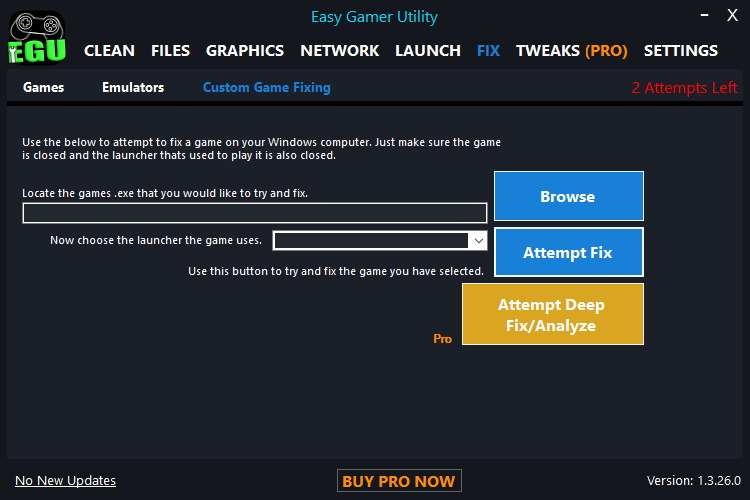
This can help with common game problems, especially if Forza Horizon 6 is crashing, not launching, closing on startup, or crashing to desktop.
You can download Easy Gamer Utility here: https://computersluggish.com/downloads/easy-gamer-utility/
Once downloaded, do the following:
- Open Easy Gamer Utility
- Click the Fix button
- Under Custom Game Fixing, click Browse
- Select the Forza Horizon 6 .exe file
- Select the launcher you purchased or installed the game on, such as Steam, Xbox app, Microsoft Store, or Game Pass
- Click Attempt Fix
- Restart your PC
- Launch Forza Horizon 6 again
This is a good step to try if Forza Horizon 6 closes after launch, Forza Horizon 6 crashes on startup, or the game keeps crashing without giving you a clear reason.
4. Update Your Graphics Driver
If Forza Horizon 6 is crashing, freezing, or showing a video card crash error, then your graphics driver could be the problem.
This is especially important if you are getting crashes like:
- Forza Horizon 6 AMD crash
- Forza Horizon 6 Nvidia crash
- Forza Horizon 6 Intel Arc crash
- Forza Horizon 6 video card crash
- Forza Horizon 6 crash to desktop
- Forza Horizon 6 freezing PC
Go to your graphics card manufacturer’s website and download the latest driver:
- Nvidia GeForce drivers
- AMD Radeon drivers
- Intel Arc drivers
After installing the driver, restart your PC and try the game again.
If the crashing started after a driver update, you could also try rolling back to the previous driver version.
5. Verify The Game Files
Corrupt or missing game files can cause Forza Horizon 6 not launching, crashing on startup, or closing after launch.

Steam
- Open Steam
- Go to your Library
- Right-click Forza Horizon 6
- Click Properties
- Go to Installed Files
- Click Verify integrity of game files
Steam will then check the game files and replace anything missing or broken.
Xbox App / Microsoft Store / Game Pass
- Open Windows Settings
- Go to Apps
- Find Forza Horizon 6
- Click Advanced options
- Try Repair
- If that does not work, try Reset
Only use Reset if needed, as it may remove some local settings.
6. Run Forza Horizon 6 As Administrator
Permission issues can sometimes cause Forza Horizon 6 crash on startup PC problems.

To run the game as admin:
- Find the Forza Horizon 6 shortcut or .exe file
- Right-click it
- Select Properties
- Go to the Compatibility tab
- Tick Run this program as an administrator
- Click Apply
- Launch the game again
This can help if the game is failing to access certain files or folders.
7. Disable Overlays
Overlays can cause crashes in some PC games, especially new releases.

Try turning off:
- Steam Overlay
- Xbox Game Bar
- Discord Overlay
- Nvidia Overlay
- AMD Overlay
- MSI Afterburner / RivaTuner
- Overwolf
- Recording software
After disabling overlays, restart your PC and test Forza Horizon 6 again.
This is worth trying if Forza Horizon 6 crashes to desktop or closes randomly while playing.
8. Close Background Apps
Some background apps can conflict with Forza Horizon 6 and cause freezing or crashing.
Close anything you do not need before opening the game, such as:
- Web browsers
- RGB software
- Game boosters
- Screen recorders
- Overclocking tools
- VPNs
- Hardware monitoring tools
- Mod tools
- Unneeded launchers
If Forza Horizon 6 keeps crashing PC, try launching the game with only Steam or the Xbox app open.
9. Disable Antivirus Or Add An Exclusion
Sometimes antivirus software can block game files or stop the game from launching correctly.
You do not need to fully remove your antivirus, but you can try adding Forza Horizon 6 as an exclusion.
Add exclusions for:
- The Forza Horizon 6 install folder
- The Forza Horizon 6 .exe file
- Steam folder, if using Steam
- Xbox app / Microsoft Store game folder, if using Game Pass
Then restart your PC and test the game again.
This can help with Forza Horizon 6 closes on startup, Forza Horizon 6 instant crash, or Forza Horizon 6 not launching issues.
10. Update Windows
Forza Horizon 6 requires Windows 10 22H2 or newer on PC, according to the Steam listing. (Steam Store)
To update Windows:
- Right-click the Start menu
- Click Settings
- Go to Windows Update
- Click Check for updates
- Install all available updates
- Restart your PC
This applies to both Forza Horizon 6 Windows 10 crash and Forza Horizon 6 Windows 11 crash problems.
11. Lower Your Graphics Settings
If Forza Horizon 6 crashes while driving, during races, or after loading into the open world, your graphics settings might be too high.
Try lowering:
- Texture quality
- Ray tracing
- Shadows
- Reflections
- Environment detail
- Anti-aliasing
- Motion blur
- Resolution scaling
Also try turning off ray tracing completely if your PC is struggling.
If you are getting an out of video memory crash, lower texture quality first, as this can use a lot of VRAM.
12. Remove Any Overclock
If your CPU, GPU, or RAM is overclocked, try setting everything back to default.
Forza Horizon 6 might crash if your overclock is unstable, even if other games seem to run fine.
This includes:
- GPU overclocks
- CPU overclocks
- RAM XMP / EXPO profiles
- Undervolts
- Custom fan or power settings
After going back to default settings, test the game again.
13. Fix Forza Horizon 6 0xc0000005 Error
If you are getting Forza Horizon 6 0xc0000005, this normally points to an access violation crash. In simple terms, the game tried to access something in memory and Windows stopped it.
This can be caused by corrupt files, drivers, antivirus software, overlays, or broken Windows system files.
Try these fixes:
- Restart your PC
- Verify the game files
- Update your graphics driver
- Disable overlays
- Add the game as an antivirus exclusion
- Run the game as administrator
- Update Windows
- Run the system file checker
To run the system file checker:
- Open the Start menu
- Type CMD
- Right-click Command Prompt
- Select Run as administrator
- Type this command:
sfc /scannow
- Press Enter
- Wait for the scan to finish
- Restart your PC
Then launch Forza Horizon 6 again and see if the 0xc0000005 Forza Horizon 6 crash has stopped.
14. Repair Gaming Services
If you are playing Forza Horizon 6 through the Xbox app, Microsoft Store, or PC Game Pass, then Gaming Services could be causing the crash.
Try repairing it:
- Open Windows Settings
- Go to Apps
- Search for Gaming Services
- Click Advanced options
- Click Repair
- If needed, click Reset
- Restart your PC
Then open the Xbox app and try launching Forza Horizon 6 again.
15. Check For Game Updates
Because Forza Horizon 6 is a new release, crashing problems may be fixed by updates from the developers.
Check for updates in:
- Steam
- Xbox app
- Microsoft Store
- Windows Update
If there is a new patch available, install it and then restart your PC.
This is important for launch problems like Forza Horizon 6 crashing on startup, Forza Horizon 6 crash Steam, or Forza Horizon 6 Game Pass PC crashing.
16. Reinstall Forza Horizon 6
If nothing else has worked, you may need to reinstall the game.
This should be a last resort because Forza Horizon 6 is a large download. The Steam listing shows around 167 GB of available storage is needed.
Before reinstalling, make sure:
- Your internet connection is stable
- You have enough SSD space
- You restart your PC after uninstalling
- You install the game back onto an SSD
Once reinstalled, launch the game before changing any graphics settings.
Check out this video on what else you can do to fix FH6:
Final Thoughts
Hopefully one of the methods above has helped fix Forza Horizon 6 crashing on PC.
If Forza Horizon 6 keeps crashing, freezing, closing after launch, or crashing to desktop, start with the simple fixes first. Restart your PC, update your graphics driver, verify the game files, disable overlays, and try using Easy Gamer Utility to attempt a custom game fix.
If you are seeing Forza Horizon 6 0xc0000005, Forza Horizon 6 video card crash, or out of memory errors, then focus on drivers, Windows updates, graphics settings, and checking your PC meets the game requirements.
As Forza Horizon 6 has only just launched for early access, it is also worth keeping an eye out for new updates, as launch-day crashes are often fixed in patches.