

Is Madden 26 crashing when you try to launch it? Does it freeze on the EA splash screen, crash mid-game, or close with no error at all? These issues are common on PC, especially after updates or driver conflicts.
This guide includes proven fixes for all major crash scenarios and helps you get back into the game — with or without a complete reinstall.
Common Crash Scenarios
- Crash on startup (nothing happens or splash screen then crash)
- Freeze on loading screen
- Crash to desktop during gameplay
- DirectX or Visual C++ runtime error
- Game closes with no error message
These are often caused by:
- Outdated graphics drivers
- Corrupted or missing game files
- Conflict with overlays or background apps
- Broken DirectX or Visual C++ installations
- Overclocked GPUs or unstable system settings
Step-by-Step Fixes for Madden 26 Crashing on PC
1. Repair the Game Files (EA App / Steam)
Corrupt or incomplete installs cause instant crashes.
On EA App:
- Open EA App > Library
- Click the three dots on Madden 26 > Repair
On Steam:
- Library > Right-click Madden 26 > Properties
- Go to Installed Files > Verify Integrity of Game Files
Let it complete and try launching again.
🔧 2. Update Your Graphics Drivers (Clean Install)
Old or incompatible GPU drivers are the most common cause of crashes.
For AMD Users:
For NVIDIA Users:
Choose the Clean Install or Factory Reset option when available.
3. Run Madden 26 as Administrator
Lack of permissions can cause silent crashes.
- Navigate to your Madden 26 install folder
- Right-click
Madden26.exe> Properties > Compatibility - Check “Run this program as administrator”
- Check “Disable fullscreen optimizations”
- Apply and launch the game again
4. Disable Overlays & Background Apps
In-game overlays and monitoring tools can cause crashes:
- Turn off:
- Steam Overlay
- EA App Overlay
- Discord Overlay
- MSI Afterburner / Rivatuner
- Xbox Game Bar
Use Task Manager (Ctrl + Shift + Esc) to close other apps while testing.
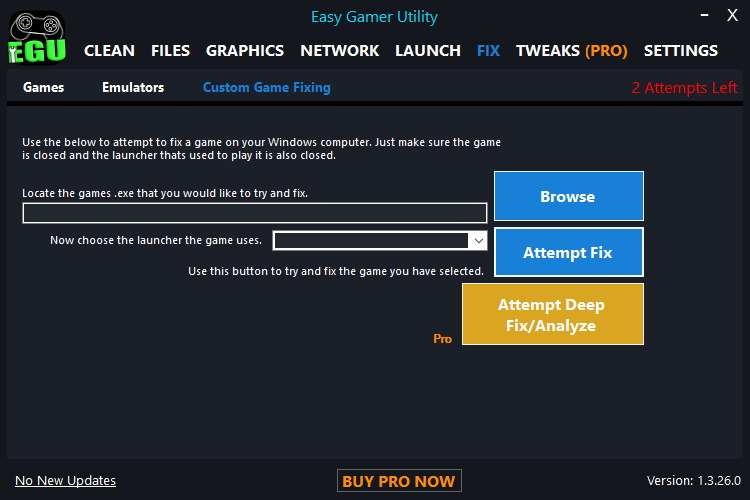
5. Use Easy Gamer Utility to Auto-Fix Common Crash Errors
If you’re looking for a fast and automated fix, try Easy Gamer Utility — designed to repair crash-related issues without digging into system settings.
Easy Gamer Utility Can:
- Clear corrupted config and cache files
- Repair broken DirectX and Visual C++ runtimes
- Scan for driver conflicts
- Disable crash-prone Radeon/NVIDIA settings
- Apply crash fixes specific to Madden 26
How to Use:
- Download Easy Gamer Utility here
- Open the app and select Madden 26
- Click “Fix Game Crashes”
- EGU will now launch the game
6. Reinstall Required Dependencies
Missing or corrupt DirectX and Visual C++ files cause frequent crashes.
Download and install:
After installing, reboot your PC and launch the game.
7. Disable GPU Overclocking
Even mild overclocks can crash Madden 26 due to its sensitive game engine.
- Open MSI Afterburner, AMD Adrenalin, or NVIDIA Control Panel
- Reset everything to stock/default values
- Save and reboot your PC
- Test the game again
8. Switch Power Plan to High Performance
Windows can throttle performance in Balanced mode.
- Go to Control Panel > Power Options
- Select High Performance (or Ultimate Performance if available)
- Restart and relaunch Madden 26
9. Clear Madden 26 Config and Cache Files
Sometimes the game saves broken settings after a crash.
- Navigate to:
C:\Users\[YourName]\Documents\Madden NFL 26 - Delete or rename the Settings folder
- Restart the game to generate fresh config files
Still Crashing? Try a Clean Reinstall
If nothing works:
- Uninstall Madden 26
- Delete all leftover folders:
- In Documents
- In your installation directory
- Reboot your PC
- Reinstall the game (preferably on an SSD)
Search Phrases This Fixes
- Madden 26 crashes on launch PC
- Madden 26 black screen crash
- Madden 26 keeps crashing to desktop
- Madden 26 DirectX error
- Madden 26 crashing with AMD GPU
- Madden 26 freezing on EA logo
- Madden 26 won’t open Windows 10 / 11
Final Tips
- Always update your system (Windows Update)
- Avoid alt-tabbing while the game is loading
- Use Easy Gamer Utility for future crashes — it’s safe to keep installed
- Turn off background recorders like ShadowPlay, OBS, or Xbox DVR while testing