
Test Google Javascript SEO Rendering
Modern websites rely heavily on JavaScript. Frameworks like React, Angular, and Vue power a huge percentage of websites today. They allow developers to build fast, interactive sites, but they can also introduce one major SEO problem: sometimes search engines struggle to see the content that JavaScript generates.
If Google can’t properly see or render your content, it may not index the page correctly, which can affect rankings and visibility.
The tricky part is that everything might look perfectly normal in your browser. You see the page, the text loads, and the site appears to work fine. But that doesn’t necessarily mean Google sees the same thing.
In this guide, I’ll explain in simple terms how to test whether Google can actually see your JavaScript content and how to check what search engines are able to crawl.
Why JavaScript Can Cause SEO Problems
Traditional websites send fully rendered HTML to the browser. Search engines can easily read that HTML and understand the content.
JavaScript websites often work differently.
Instead of sending a finished page, the server sends a basic HTML shell and then JavaScript loads the content afterward. This process is called client-side rendering.
That means:
- Google first crawls the page.
- It downloads the JavaScript.
- It renders the page later to generate the final content.
Google can render JavaScript, but the process isn’t always immediate. Rendering takes extra resources, and sometimes Google delays it or misses certain elements.
This can cause problems like:
- Text content not appearing in the indexed version of the page
- Internal links not being discovered
- Metadata not being read correctly
- Pages taking longer to be indexed
Because of this, it’s important to test whether the content on your site is visible before and after JavaScript rendering.
The Simple Test: View Page Source
One of the easiest ways to start is by comparing the raw HTML with what you actually see in the browser.
Open the page you want to test and right-click anywhere on the page. Then select View Page Source.
This shows the original HTML that the server sent to the browser before JavaScript runs.
Now try searching within the source code (Ctrl + F) for a piece of text that appears on the page.

If the content is missing in the source code, that usually means the text is being added by JavaScript.
That’s not necessarily bad, but it does mean Google has to render the page to see it.
Compare With Inspect Element
Next, right-click the page again and choose Inspect or Inspect Element.
This shows the rendered DOM, which is the page after JavaScript has executed.
If you search for the same text again, you will likely see it here.
This comparison shows the difference between:
- Raw HTML
- Rendered HTML
Search engines need to render the page to see the final version.
Use Google Search Console URL Inspection
Another good way to test JavaScript visibility is using Google Search Console.
Inside Search Console:
- Open URL Inspection
- Enter the page URL
- Click Test Live URL
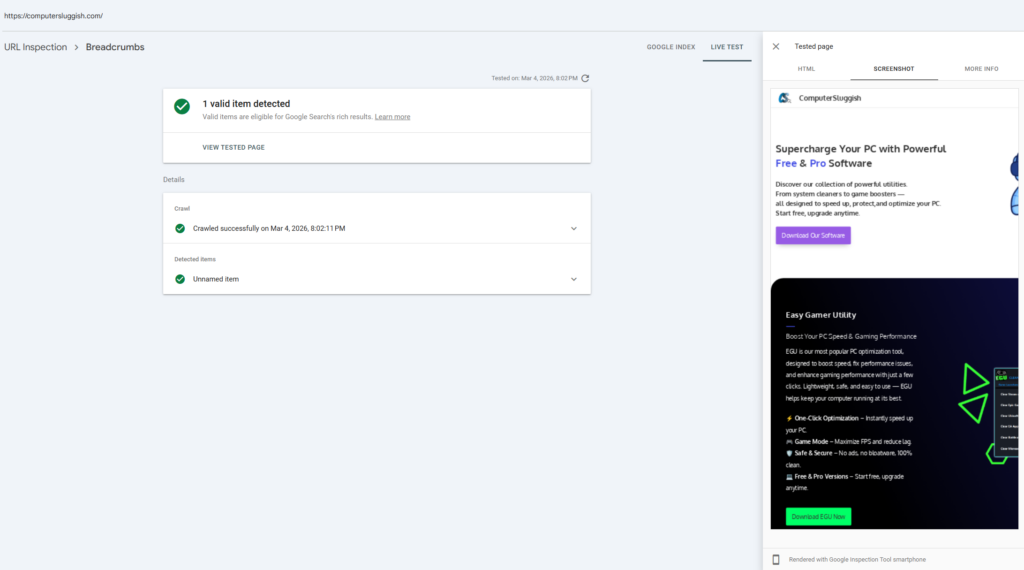
Once the test finishes, you can view the rendered page screenshot and HTML.
If content appears missing here, it may not be visible to Google.
This tool gives you a rough idea of how Googlebot sees the page, although it doesn’t always reveal every technical detail.
Why SEO Crawlers Are Useful for Testing JavaScript

The methods above are useful, but they have limitations.
For example:
- You can only test one page at a time
- You can’t easily crawl an entire website
- It’s harder to compare rendered vs non-rendered content
This is where SEO crawlers become very useful.
An SEO crawler can scan your website the same way a search engine does and reveal how pages appear before and after JavaScript rendering.
I personally find this much easier than manually checking pages one by one.
Testing JavaScript Rendering With CrawlRhino SEO Crawler
One tool I’ve been using recently for this is CrawlRhino SEO Crawler.
It’s a Windows-based SEO crawler that includes JavaScript rendering, which means it can load pages the same way a real browser would.
You can learn more about it here: https://crawlrhino.com/crawlrhino-seo-crawler/
The nice thing is you can test a few pages with JavaScript rendering enabled without needing a full setup.
How to Use It to Test JavaScript Content
The basic idea is simple.
First, before you run a normal crawl of your website you need to make sure JavaScript rendering is enabled.
When rendering is enabled, the crawler loads the page fully and executes the JavaScript, just like a browser would.
Now you can compare the results.

Sometimes the difference is quite surprising.
You might discover:
- Missing page titles
- Hidden internal links
- Content only visible after rendering
- Metadata not appearing in the raw HTML
These kinds of issues can explain why certain pages struggle to rank.
A Common JavaScript SEO Problem
One thing I see quite often is websites that load navigation links using JavaScript.
The links appear fine when browsing the site, but in the raw HTML they simply don’t exist.
If Google doesn’t render the page properly, those links might never be discovered.
That can lead to crawlability issues where large sections of a website remain hidden from search engines.
Running a crawl with rendering enabled quickly exposes this type of problem.
React and Angular Sites Often Need Testing
JavaScript frameworks like React and Angular are powerful, but they rely heavily on client-side rendering.
That’s why testing JavaScript visibility becomes even more important.
Some modern setups use server-side rendering or pre-rendering, which helps search engines access the content more easily.
But not every site is configured correctly.
Using a crawler with rendering allows you to verify what search engines actually see.
Testing More Than Just One Page
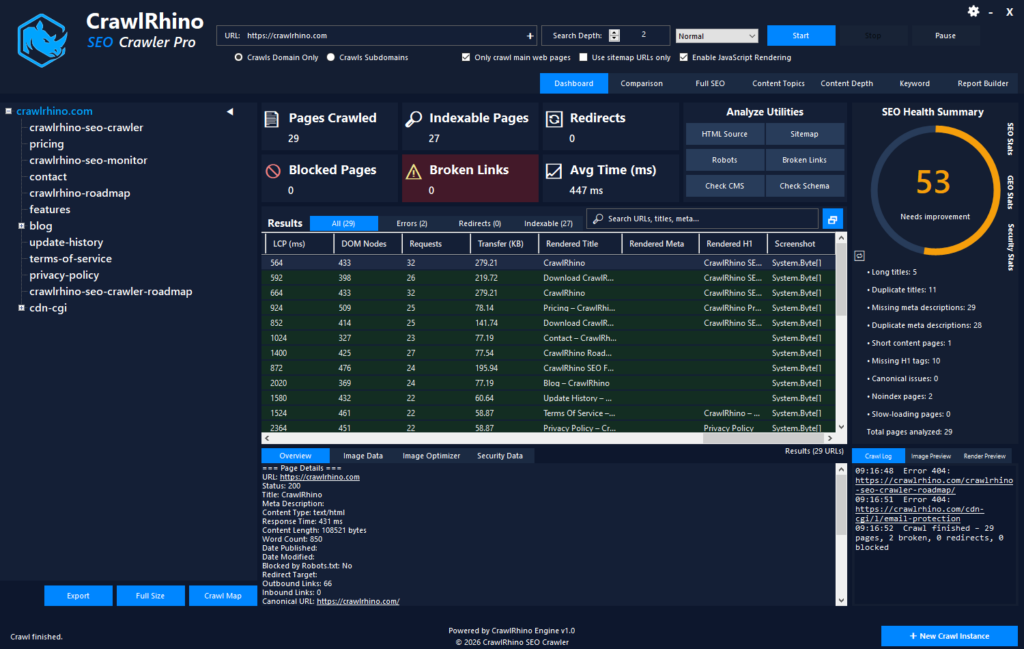
Another advantage of using a crawler is scale.
Instead of checking a single URL, you can analyse an entire website.
This helps uncover problems like:
- pages missing rendered content
- navigation links hidden behind JavaScript
- pages with incomplete metadata
- broken internal linking structures
These issues are very difficult to detect manually.
My Advice for Website Owners
If you run a modern website that relies on JavaScript, don’t assume search engines automatically see everything correctly.
In most cases things work fine, but when they don’t, it can quietly affect indexing and rankings.
Testing how your pages render is one of the easiest ways to catch problems early.
Start with simple checks like page source and Search Console, but if you want a clearer picture of what search engines see across your entire site, running a crawl with JavaScript rendering enabled makes a big difference.
Tools like CrawlRhino SEO Crawler make this process much easier because you can analyse both the raw HTML and the rendered version of pages.
Final Thoughts
JavaScript isn’t bad for SEO, but it does introduce an extra step that search engines have to handle.
The important thing is making sure your content, links, and metadata are still visible when the page is crawled and rendered.
Testing this isn’t complicated once you know what to look for.
If you want to explore how your own site behaves, try crawling a few pages using a tool that supports JavaScript rendering and compare the results. It’s one of the quickest ways to understand how search engines actually see your website.
You can try CrawlRhino SEO Crawler to test JavaScript rendering on your pages.
It’s a practical way to spot JavaScript SEO issues that would otherwise be very easy to miss.