
Why JavaScript Can Cause SEO Problems
JavaScript is used on a huge number of modern websites. It allows developers to create fast, interactive pages and build powerful applications using frameworks like React, Angular, and Vue.
But from an SEO point of view, JavaScript can sometimes cause problems if it isn’t implemented carefully.
I see this fairly often when analysing websites. Everything looks completely normal in the browser, but when you actually crawl the site or check the raw HTML, important parts of the page are missing.
Search engines can process JavaScript, but they don’t always handle it instantly or perfectly. If content or links depend heavily on scripts, it can sometimes slow down crawling or even prevent parts of the site from being indexed properly.
Below are some common JavaScript SEO problems that can hurt rankings and what to look out for.
Content That Only Appears After JavaScript Loads

One of the biggest issues with JavaScript websites is content that doesn’t exist in the original HTML.
Instead of the server sending the full page, it sends a basic template and then JavaScript loads the text and other elements afterward.
For visitors this usually works fine because browsers run JavaScript easily. But search engines first crawl the raw HTML before rendering the page.
If the important content isn’t present in that first version, search engines may not see it straight away.
This doesn’t always break SEO, but it can delay indexing and sometimes cause pages to appear almost empty to crawlers.
Internal Links Hidden Behind JavaScript
Internal links are extremely important for SEO because they help search engines discover and crawl the rest of your site.
Some modern websites build navigation menus entirely with JavaScript. That means the links only appear once the script runs.
If a crawler cannot see those links in the initial HTML, it might not discover all of your pages.
In extreme cases this can lead to large sections of a site being difficult for search engines to crawl.
It’s always worth checking whether your navigation and internal links are visible without relying completely on scripts.
Metadata Generated With JavaScript

Another problem I sometimes see is page titles or meta descriptions being generated after the page loads.
From a developer’s perspective this might seem perfectly logical, but from an SEO perspective it can cause issues if the metadata isn’t visible when the page is first crawled.
Search engines need access to important information such as:
- page titles
- meta descriptions
- canonical tags
If these elements are injected later with JavaScript, search engines may not always pick them up correctly.
Slow Rendering Delays Indexing
Search engines usually crawl pages first and then render JavaScript later.
This process is sometimes called two-wave indexing.
The first wave reads the raw HTML. The second wave renders the JavaScript to process the rest of the page.
If a site relies heavily on JavaScript, rendering may take longer. This can delay indexing and make it slower for search engines to understand your content.
For websites publishing lots of content regularly, that delay can make a noticeable difference.
Pages That Look Empty to Crawlers
One thing that surprises many website owners is how different their site can look when viewed by a crawler.
When analysing JavaScript-heavy sites, I sometimes see pages that appear almost empty in the raw HTML.
All the text, headings, and links are loaded later by scripts.
To a normal user everything looks fine, but a crawler that doesn’t render JavaScript might think the page contains very little information.
This is why testing both the raw HTML and the rendered version of a page is important.
Broken Links Created by JavaScript
Sometimes JavaScript generates links dynamically or changes URLs after the page loads.
If those links are not structured properly, crawlers may struggle to follow them.
For example, some sites use buttons or scripts that trigger navigation instead of standard HTML links.
Search engines are much better at following normal <a> links than JavaScript-driven navigation.
If the crawler cannot recognise the links, parts of the site may be harder to discover.
How to Check for JavaScript SEO Problems
The easiest way to spot these issues is to compare what appears in the raw HTML with what appears after the page is rendered.
You can start by viewing the page source and searching for important text or links. If the content is missing there, it means it is probably being loaded by JavaScript.
However, checking pages one by one can be slow, especially if your site is large.
This is where SEO crawlers that support JavaScript rendering become very useful.
Using CrawlRhino SEO Crawler to Test JavaScript Rendering
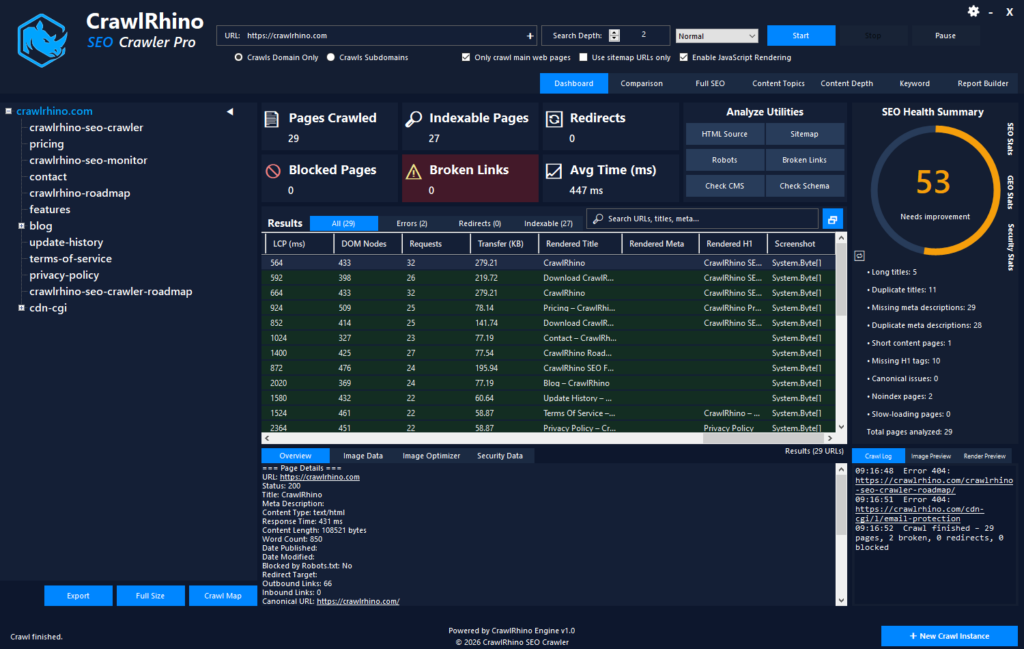
When I want to check how a JavaScript website behaves, I usually run two different crawls.
First I crawl the site normally to see the raw HTML version of the pages.
Then I run another crawl with JavaScript rendering enabled.
One tool that works well for this is CrawlRhino SEO Crawler download here.
Running both types of crawls allows you to compare the results and see what content only appears after JavaScript runs.
Sometimes the difference is small, but other times it reveals missing links, missing content, or metadata that only exists in the rendered version.
Catching these issues early can make it much easier to fix them before they affect rankings.
My Advice When Working With JavaScript Websites
JavaScript itself isn’t bad for SEO. In fact, many very successful websites use it heavily.
The key is making sure important information is still accessible to search engines.
Things like content, links, and metadata should ideally be available as early as possible when the page loads.
Testing your site with both normal crawls and rendered crawls can quickly show whether JavaScript is hiding anything important.
If everything looks the same in both versions, then you’re probably in good shape.
Final Thoughts
JavaScript makes modern websites more powerful, but it also adds another layer that search engines need to process.
Problems like hidden content, missing links, or delayed rendering can affect how easily search engines understand your site.
The best approach is simply to test how your pages appear before and after JavaScript runs. Once you understand that difference, it becomes much easier to spot potential SEO problems.
Running a crawl with JavaScript rendering enabled can reveal issues that are almost impossible to detect just by looking at the site in a browser.
If you manage or develop JavaScript-heavy websites, it’s definitely worth checking how search engines see your pages from time to time.