
Easy System Utility 1.1.53 Update
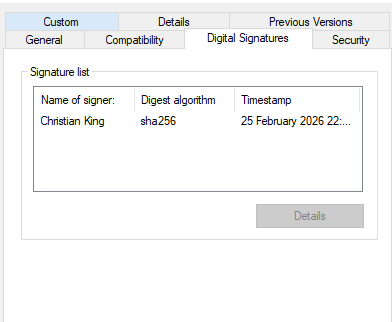
Easy System Utility version 1.1.53 introduces digital code signing, improving security, trust, and the installation experience for users downloading the software.
Digital signing helps verify that the application comes directly from the official developer and has not been modified or tampered with. This update strengthens software authenticity while reducing Windows security warnings, making it safer and easier to install trusted PC optimisation and cleaning tools.
Added Digital Code Signing Certificate
This update introduces a trusted digital certificate for Easy System Utility. All installers are now digitally signed, allowing Windows to verify the publisher and confirm the integrity of the software.
Code signing ensures downloads remain authentic and unchanged from the original release — an important improvement for system utilities designed to clean junk files, optimise performance, and maintain Windows stability.
Users will now see clearer publisher verification during installation, helping confirm the software is safe and legitimate.
Improved Installation Trust and Security
Digitally signed software helps reduce warning messages shown by Windows SmartScreen and other security systems. This creates a smoother installation process while improving user confidence when launching the application.
Unsigned utilities can sometimes trigger unnecessary alerts even when safe. Digital signing helps prevent these false warnings and ensures Easy System Utility installs reliably across modern Windows systems.
This improvement supports a safer experience for users looking to clean junk files, free up disk space, and improve overall PC performance.
Why Digital Signing Is Important
Digital certificates play an important role in modern software distribution by allowing operating systems to verify software authenticity and security.
Without digital signing, Windows cannot confirm who published an application, which may result in security prompts during installation.
Digital signing helps provide:
• verified software authenticity
• improved installation trust
• reduced Windows security warnings
• enhanced protection against tampering
• safer downloads for PC cleaning and optimisation tools
These improvements help ensure users can safely install software designed to speed up Windows, remove unnecessary files, and improve system reliability.
Continuous Improvements and Development
Easy System Utility continues to receive ongoing updates focused on improving performance, usability, and compatibility with modern Windows environments.
Development efforts remain focused on helping users maintain a fast, clean, and stable PC through effective junk file cleaning, browser optimisation, and system maintenance tools.
Ongoing testing and improvements ensure Easy System Utility remains a reliable free Windows cleaner and PC optimisation solution.
Download Easy System Utility
You can download the latest version of Easy System Utility here: